

The Load Case Manager with SOLIDWORKS Simulation enables designers and engineers to quickly and efficiently analyze stresses and deformations under general conditions while they create their design for high quality, performance, and safety.
Loads Overview
Loads and restraints are needed to define the service environment for the model. Analysis results directly depend on the specified loads and restraints. The defined loads and restraints are applied to geometric entities as features that are fully associative to the geometry and that automatically adjust to geometric changes.
The types of loads available depend on the type of the study defined. You can apply to your model:
- Pressure (uniform or variable along Cartesian, Cylindrical, and Spherical Coordinates systems)
- Force, moments or torque (uniform or variable along Cartesian, Cylindrical, and Spherical Coordinates systems)
- Gravity (linear accelerations)
- Centrifugal force (angular velocity and acceleration)
- Remote loads
- Bearing loads (between contacting cylindrical faces)
- Temperature
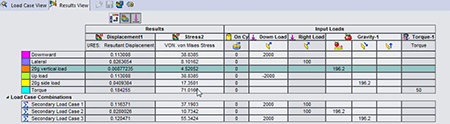 Load Case Manager Overview
The Load Case Manager allows product engineers to define secondary load combinations from primary load definitions quickly and evaluate the effects of the various load combinations on the model. Users can then evaluate their design for multiple load cases.
For example, you can combine wind loads and snow loads in a single model with a user defined equation.
You can create SOLIDWORKS sensors to track specific results for all load cases (primary and secondary), as well as view all the results for primary and secondary load cases.